Showing posts with label Blogging tricks. Show all posts

18 Jun 2013

How to Connect Twitter to Feedburner Directly Without Any App ?

Posted by Unknown  |  at  8:40 am

feedburner-twitter-integration

Hello guys we are back with another amazing tricks which allows you to connect your feedburner URL directly to Twitter.A few years ago Google Feedburner had an option to socialize your blogs that lets you to share your blog post directly to twitter from the feedburner.Because of some reasons Google had stopped that service.So people depended upon some third party apps to socialize their blogs for their convenience.But recently Google has restarted the service so you can enjoy socializing your blog posts without using any third-party applications


How to Connect Twitter to Feedburner Directly Without Any App ?
  • Remove third-party apps from Twitter

    First of all, to avoid any redundancy, you have to first remove any auto-scheduling apps for Twitter. To do this, log into your Twitter account, and click on the gear icon on the top-right corner. Then click Settings. Now, from the left sidebar, click on the Apps tab.

    Here, you will see all the Apps that you're using with your Twitter account. Next to each app is a Revoke Access button, which essentially deletes the app. Delete any scheduling apps you're using to auto-share your blog posts to Twitter, such as twitterfeed.

    remove-twitterfeed

  • Share updates using Socialize

    Sharing your updates on Twitter is now easier than ever. To use Socialize, follow these steps;

  1. 1.Log into your FeedBurner account, and select the feed you want to share on Twitter.
  2. 2.Click on the Publicize tab
  3. 3.Click on Socialize from the left sidebar

connect-twitter-to-feedburner

Now,after doing this whenever you publish a blog post the feedburner will be automatically updated and at that instant it will be directly connected and shared with your twitter  account.So the tasks will be reduced…

30 Apr 2013

How To Get Absolutely Free .Com .Org .In Domains

Posted by Unknown  |  at  5:22 am

1

Hi Our dear Readers we are back with another Freebie.Are you searching for getting a free domain?Then read the following.In this tutorial we are going to show you how to earn a free domain by simply writing a review of any webhosting company.This service is provided by http://www.whoishostingthis.com  Here you only want to do is to write a  high quality review of any webhosting services in their list.If they approve and publish your review you are ready to own an absolutely free domain whatever you like(.com .org .in or any others).

You Might Also Like : Get .com .org or Any Top Level Domain For Just $0.50

How to Get the Free Domain ?
  • First of all visit here.
  • Click on Earn a free Domain for writing a review.
  • Now you can see a list of webhosting services by scrolling down.
  • From the list you have to select any webhosting service you like and write quality review and submit it along with your details.
  • Conform the email and when you conform then a mail come to your email then click on that and see how many sites offer you domains.
  • Now your are done.

Screenshot :

12

Which Type Of Hosting Reviews Will be Qualified ?
  • Only  high-quality reviews
  • Reviews must be unique & your own work
  • Only reviews of certain hosts are eligible

You Might Also Like : Avast Antivirus 8 With Crack Till 2050 (100% Working)!

From The Editor’s Desk…

Guys what are you looking for ? Don’t miss this valuable opportunity and just try it out and comment your views below.We will be back with another amazing and awesome trick.Stay connected.

12 Feb 2013

How to add stylish customised subheadings to blogger

Posted by Unknown  |  at  3:21 am

image

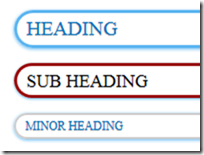
Headings and subheadings are one of the most important parts in a post.Usually the readers don’t have the patience to read the complete post in one go.When the headings and subheadings of the post are attractive the readers may like to read it and the posts will be impressive.Also it gives a nice layout to the post,it will be very helpful to retain the visitors to the blog.

So for this,you should ensure that your headings and subheadings looks beautiful and stylish.For this I’ll show you how to make your headings,subheadings and minor headings stylish by CSS hover effect with colorful borders.

Please follow the below simple steps:

Customize your post title.
  • Go to blogger dashboard>Design>Edit HTML
  • Now press ctrl+f and find .post h3 and replace all of its contents with the code below.
/* The creator of this code is www.vmtricks.blogspot.com.com please don't change any thing without owner permisson */ .post h3 { text-align:left; font-size: 18px; font-family: Oswald; font-weight:normal; color:#000; padding: 3px 10px 3px 10px; text-shadow: 0 1px 0 #CCC; border: 3px solid #980303 ; -moz-border-radius: 90px; -webkit-border-radius: 90px; border-radius: 90px;-moz-box-shadow: 0 1px 2px #5bb5f0, 1px 1px 0 rgba(255, 255, 255, 0.4) inset; -webkit-box-shadow: 0 1px 2px #5bb5f0, 1px 1px 0 rgba(255, 255, 255, 0.4) inset; box-shadow: 0 1px 2px #5bb5f0, 1px 1px 0 rgba(255, 255, 255, 0.4) inset; margin: 15px 3px; text-transform: uppercase; line-height: 1.3; background:white; transition:background 2s; -moz-transition:background 2s; /* Firefox 4 */ -webkit-transition:background 2s; /* Safari and Chrome */ -o-transition:background 2s; /* Opera */ } .post h3 a, #content h1 a:visited { color: #000; font-size:17px; font-family: Georgia, Times New Roman; font-weight: normal; margin: 0 0 2px; padding: 4px 0 0; } .post h3:hover { color:#FFF; font-size:18px; text-decoration: none; background:red; border: 3px solid #000; }
Customize your subheadings
  • Go to blogger dashboard>design>Edit HTML
  • Press Ctrl +F.Find .post h2 and replace it with the following code below.
.post h2 { background: url("http://aux3.iconpedia.net/uploads/6930445441486693898.png") norepeat 2px center transparent; font-size: 20px; font-family: Oswald; font-weight:normal; padding: 3px 10px 3px 10px; color: #0274be; background:white; border: 3px solid #5bb5f0; text-shadow: 0 1px 0 #CCC; -moz-border-radius: 60px; -webkit-border-radius: 60px; border-radius: 60px; -moz-box-shadow: 0 1px 3px #5bb5f0, 1px 1px 0 rgba(255, 255, 255, 0.4) inset; -webkit-box-shadow: 0 1px 3px #5bb5f0, 1px 1px 0 rgba(255, 255, 255, 0.4) inset; box-shadow: 0 1px 3px #5bb5f0, 1px 1px 0 rgba(255, 255, 255, 0.4) inset; margin: 15px 3px; text-transform: uppercase; line-height: 1.3; transition:background 2s; -moz-transition:background 2s; /* Firefox 4 */-webkit-transition:background 2s; /* Safari and Chrome */ -o-transition:background 2s; /* Opera */ } .post h2:hover { background: url("http://aux3.iconpedia.net/uploads/6930445441486693898.png") norepeat 6px center transparent; background:#06F; color:#FFF; border-color:#FFF; }
Customise your minor headings
Minor headings in blogger use h4 tags.For its customization:
.post h4 { background-size:20px 20px; font-size: 12px; font-family: Oswald; font-weight:normal; padding: 3px 10px 3px 10px; color: #0274be; border: 2px solid #CCC; text-shadow: 0 1px 0 #CCC; -moz-border-radius: 30px; -webkit-border-radius: 30px; border-radius: 30px; -moz-box-shadow: 0 1px 3px #5bb5f0, 1px 1px 0 rgba(255, 255, 255, 0.4) inset; -webkit-box-shadow: 0 1px 3px #5bb5f0, 1px 1px 0 rgba(255, 255, 255, 0.4) inset; box-shadow: 0 1px 3px #5bb5f0, 1px 1px 0 rgba(255, 255, 255, 0.4) inset; margin: 15px 3px; text-transform: uppercase; line-height: 1.3; transition:border 2s; -moz-transition:border 2s; /* Firefox 4 */ -webkit-transition:border 2s; /* Safari and Chrome */ -o-transition:border 2s; /* Opera */ } .post h4:hover { border:#5bb5f0; }
  • That’s all guys.Enjoy!!!!!!!!!!!!

    For further help just comment down below.We will be releasing more stylish headings
    and more demanded tutorials and tricks soon.So stay updated and subscribe to our blog
    I hope you liked this tutorial.

    For any related queries please comment below.

11 Jan 2013

Easy To Earn Money From a Blog

Posted by Unknown  |  at  6:18 am


Easy To Earn Money From a Blog

If you ask to a blogger, how much Easy is to Earn Money from a Blog? Most of them will answer
it’s so easy, Just register a domain name, get a hosting and start your blog, create some unique
and useful contents, update your blog regularly, add Google Adsense ads, and enjoy blogging with
cash. It seems so simple but honestly it is not easy for everyone. Creating a blog is easy but
making a blog profitable is too difficult.
Y ou can find many eBooks or online tutorial which will guarantee to
make your blog successful in just 30 days or 45 days, that noise great
but in fact this sound is so bad because subscribing or buying those
types of eBooks is just waste of money and time. But there are many
peoples and bloggers who have found these types of eBooks working.
It’s all about Content Writing Skill, Y our Point of View and Way of
Presenting. But this means not that there is no any way to make your
blog profitable.
Y ou need patience and eagerness to learn. The time is the most
important factor to develop a blog network over internet. If you ask
any professional blogger, they will answer the same. Therefore you can't avoid it. It also apply for
your blog domain name because Search Engines not trust on new domain names, according to
me your need at least 10 months to get trusted by all search engines. This is very important also
when you want to earn good cash from your blog. Because For driving traffic you need a good
blog, and for developing a good blog you need some time. So that it basically turn around the
time. It also depends upon your luck too, because there are many bloggers who has been left
blogging due to frustration. Because after creating useful and unique contents they feel unable to
drive traffic to their blogs.
So it is also recommended don't make blogging as your professional or full time work until you
create a good niche.
 by vmtricks

Subscribe
Get our latest posts directly in your email inbox.

What they says

All content provided here are copyrighted material of their respective owners. VM Tricks didn't upload anything, and the contents are collected from various sources across the web,so we take no responsibility of any of its illegal usage. The content provided here is for preview,testing and educational purposes only, We are in no way responsible to copyright issues that pertain throughout any download(s). So if you like anything BUY IT ! If you believe you are the copyright owner of any content provided on this site and want it to be removed,use “Contact us” button with valid proof of ownership.
Copyright © 2013 VM TRICKS. Blogger Template by BloggerTheme9
Proudly Powered by jee main 2015 result.
back to top